

Park Seismic LLC, Shelton, Connecticut, Tel: 347-860-1223, Fax: 203-513-2056, Email: parkseis@parkseismic.com
| ParkSEIS - Modeling Dispersion Curves 1. Importing Input Data | 1D S-Velocity (Vs) Model (i.e., Layered-Earth Model) (*.lyr) |
| In the main menu, go to "Modeling" → "Dispersion Curve(s) from 1D Layered-Earth Model (*.LYR)" and then select a file. |

| 2. Execute Modeling Click "OK" button to execute the modeling a dispersion curve for the fundamental mode (M0). |

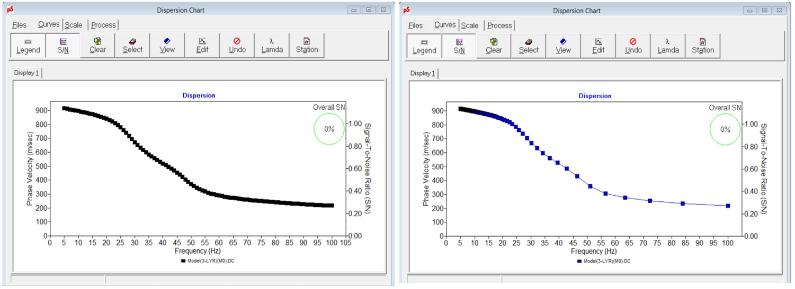
This (left) is an output example with even frequency interval (1 Hz). This (right) is an output example with "stretching"
frequency interval.
frequency interval.
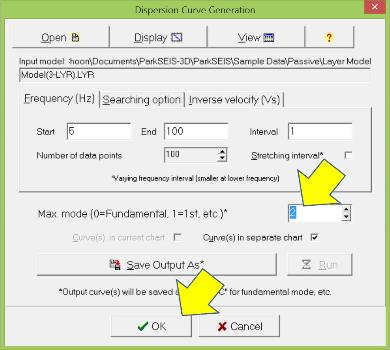
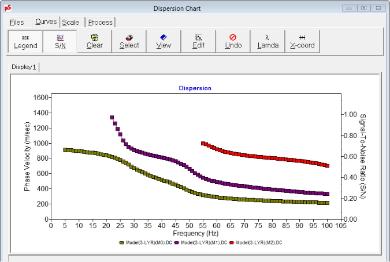
To model multiple modes simultaneously, specify a non-zero number (e.g., 2) in the maximum mode box of the control dialog
(left). Then, modeled multiple modes (e.g., M0, M1, and M2) will be displayed in a chart (right).
(left). Then, modeled multiple modes (e.g., M0, M1, and M2) will be displayed in a chart (right).
 |  |  |  |  |  |  |  |  |  |  |  |  |

